
ClickFix: How You Are Part of the Attack
 Human error is a top vulnerability for any business’ cyber security. Users’ sense of urgency, trust and/or a momentary lapse in judgement are preyed on by cyber criminals using social engineering techniques. ClickFix is an attack strategy that dupes users into thinking they are helping themselves. Attackers hope to deceive users well enough that when a solution is presented, they don’t think twice before interacting.
How ClickFix Works
ClickFix is human reliant, meaning the user needs to run the malicious code for it to work successfully. To do this, bad actors mimic legitimate applications and present an error message or verification prompt in the form of a popup. When presented with a few steps to ‘fix’ the error, users feel confident to execute the commands themselves.
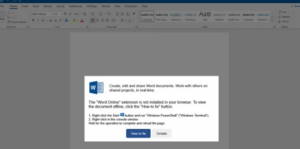
Example of a ClickFix Attack
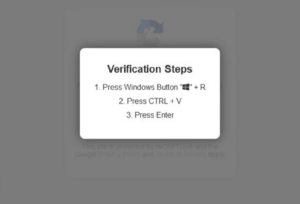
As modeled in the graphic below, the pop-up is disguised as a CAPTCHA. CAPTCHA is a common tool used by millions of websites to deter spam attacks. This fake prompt instructs the user to press the Windows key + R (open the dialog box), press CTRL + V (paste the code) and hit Enter (run the malware) while disguised as the trusted tool.
Helpful Tips for Your Business
- Educate Employees: Keep your team informed on popular tactics so they know what to look out for. Security training empowers your employees to question the validity of pop ups or messages they may come across.
- Base user permissions on ‘least privilege,’ e.g. the minimum level of access users need to perform their work. Removing local administrator permissions on a user’s workstation and having those permissions managed and granted by IT will prevent even a successfully executed ClickFix attack.
- Keep Software Updated: Regularly running updates will patch vulnerabilities that could be exploited in an attack.
- Utilize Your IT: When in doubt, contact your IT team to investigate. Whether it is a suspicious CAPTCHA, email or pop-up, your IT team can act quickly to prevent a breach.
A small mishap can lead to a major security incident. Being proactive is the best combatant for these fast-growing and subtle tactics. Contact us at info@kazmarek.com to discuss more ways to protect your business.